Imagina (Version: A 1.7 build as of this post) calls itself the next generation image viewer and editing tool or ‘virtual lightbox’. Its interface features the Microsoft Office style ribbon. Images can be opened using the camera icon in the top left corner and then any one folder viewed in one of several ways. One viewing method is the 3D effect, an attractive if somewhat CPU intensive way of navigating image folders.
Imagina also features such tools as noise reduction, support for tags, flip, resize and straighten among others. A ‘period style’ feature is a slightly enhanced sepia and black and white effect. Imagina also does a bit more than usual in the colour editing department in terms of its brightness, hue and saturation controls.
As image viewers go Imagina is more advanced and does a bit more than one might expect. Look for its additional features including playing movies at http://www.planetimagina.com/about.html
Author: Reza
-
Freeware Shorts: Imagina
-
Freeware Shorts: Dolphin Text Editor Menu
Dolphin Text Editor Menu (Version: 2.7 as of this post) is an enhancement and efficiency tool that works with most text editors and browser text areas such as MS Word, gmail, forum reply text areas, most if not all text editors and more. It applies or adds formatting, sorting, aligning, reversing and lots more to any text being worked on. Some examples of its features are remove blank lines, align text, append text – this adds text to the end of each line – convert to plain text, word count and get file names – this copies file names of selected files into the clipboard – and many more.
Dolphin Text Editor Menu sits in the tray and works in addition or in conjunction with the text editor or browser. The default keys to launch it are Ctrl+Numpad0. -
Freeware Shorts: DesyEdit
DesyEdit (Version: 3.5 as of this post) is a tabbed text editor. It also features syntax highlighting for HTML, C++, SQL, XML, PHP and others. Additionally it includes FTP support to work with documents within DesyEdit and HEX and column editing as well.
DesyEdit becomes even more useful with its bookmarks, macros recording, case, tab and space conversions, full screen mode and print preview capabilities. It can also ‘print all open windows’, stay on top and open documents in read only mode.
DesyEdit is worth a consideration when looking for freeware editors. -
Freeware Shorts: AtoZ Notebook

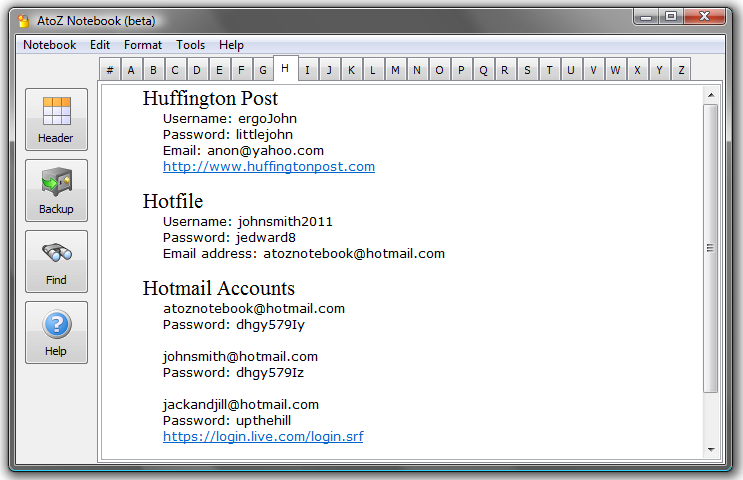
AtoZ Notebook (Version: 0.111 Beta as of this post) is a free form notebook that aims to resemble a paper notebook. It is divided into 27 tabs (a to z and #) where notes can be jotted down in alphabetically.
Once open click the Header button and start typing. Use any of the usual formatting options (font, indent, etc.) to shape the notes as required and choose a password to open your notes as well. Also one gets to choose one of two options for the location of the stored notes. AtoZ Notebook also does backups in RTF format so the notes are usable elsewhere as well, therefore sparing the user from dealing with propriety formats. -
GDocsDrive: Google On Your Desktop … Giveaway!

The giveaway has now ended, thanks to those who participated and The Cloud Drive Team for providing giveaway licenses.
GDocsDrive is a program that lets you manage your google documents straight from the desktop, essentially acting as a disk drive but one that is in the cloud.
Google’s office suite, the alternative to Microsoft Office, offers a way to create documents, presentations, spreadsheets and more. To use these office programs online you can log in and start working on new documents or import or upload existing documents, however GDocsDrive gives you the chance to do more. Unlike google docs GDocsDrive lets you upload folders, instead of individual documents, to google docs.
It also supports google docs’ other features but perhaps easier through your desktop, these include sharing document(s) with others, by entering their email address(es), or making the document(s) public. It is possible to convert files to other formats and to search them from within GDocsDrive itself. Perhaps most importantly GDocsDrive is an easy way to back up files and let google store them or back them up for you.
The Cloud Drive Team, the people behind GDocsDrive, have offered several licence keys for GDocsDrive, which you can win by commenting below! -
Freeware Shorts: Directory Monitor

Directory Monitor (Version: 1.0.2.0 as of this post) is a program that keeps an eye on or monitors any number of directories for file additions, changes and deletions. These could be local or directories located on a network. These kinds of programs are very useful because a user can see and know what happens when for example a program is installed or uninstalled. As a more specific example many programs have a habit of creating directories in the My Documents folder and when uninstalling these sometimes cryptically named folders remain. Directory Monitor makes such scenarios more manageable.
Directory Monitor can generate alerts or tool tip balloons when changes occur and can also execute a command when a change happens. .NET Framework required. -
Wondershare DVD Slideshow Builder
Read the update below, Wondershare are having a giveaway on their Facebook page!
Spotlight is on DVD Slideshow Builder in the continuing series of posts highlighting software by Wondershare.
DVD Slideshow Builder’s main feature is the ability to drag and drop photos, videos and/or music to produce a movie. It also features transitions to add effects to the production and one click burning to DVD and sharing on the usual suspects such as Youtube and Facebook. For ease of use DVD Slideshow Builder comes with a wizard and a time line interface to walk the user through creating a movie.
In addition to the usual crop and rotate tools styles are also available to make the movies more professional looking.Voice overs are supported as are DVD menu creation and a choice between 4:3 and 16:9 aspect ratios.
DVD Slideshow Builder is not freeware but is featured in (non-financial) cooperation with Wondershare.
If you didn’t have the luck to win the free software in the blog, you still have a chance to get it in Wondershare’s Facebook from May 9th to 20th. One click away: http://goo.gl/yQfCo Good luck!
-
Freeware Shorts: DocPad

DocPad (Version:10.0 as of this post) is a text editor and an enhanced alternative to Notepad. Beside the typical plain text editing it offers the following and more.
Adding or removing indentations. Bookmarking specific lines. Jumping to a specific line. Removing extra spaces. Converting case. Converting between formats like Base-64, UTF-7 and others. Dragging and dropping files or chunks of text. Spell checking.
DocPad has built in calculator, calendar and character map tools as well. -
Freeware Shorts: NoteFly

NoteFly (Version: 2.0.0 RC1 as of this post) is a sticky note application that offers a few features to store and manage notes. Sticky notes that are viewable on the desktop can be re-sized, use different colors and also be transparent. A note can also be ‘stuck on top’ and remain visible or locked or hidden.
It is also possible to set up NoteFly to email a note and to tweet or post the note on Facebook. The latter seems to be buggy and/or not possible as of this post but that may change in a future version.
NoteFly is only around 200KB, does not use the Windows registry, is open source software and requires the .Net framework 2.0 which is already installed on Windows Vista and 7. -
Freeware Shorts: Winyl Skinnable Audio Player

Winyl (Version: 2.50 as of this post) is an audio player and an audio organizer as well. It lets the user organize files or songs by rating and other categories and also create playlists. Those playlists can be dynamic, that is they can be based on song ratings for example.
It strives to use little system resources plus it is skinnable and supports album art images. As of this post a few skins are available with the download and at the program author’s forums. Supported file formats include the usual MP3, OGG, WMA, AAC, M4A and others.