Author: Reza

  • CollageIt Review And Giveaway

    Comment below for your chance to win a CollageIt license from Pearl Mountain Software!

    CollageIt is another very easy method to create image or photo collages. CollageIt provides templates to create a virtually unlimited number of image or photo collages.

    CollageIt

    When first opened CollageIt provides 15 general templates. These spread or distribute images in somewhat different and random ways. After choosing one of the templates the main program interface opens where photos from one or several locations can be added. If you need to you can choose a different template from the bottom left corner.

    The Page Setup button lets you pick a page size. Desktop wallpaper, A4, scrapbook and envelope are just a few of the available sizes. DPI (dots per inch) and orientation are also options here.

    The Background button lets you choose a gradient or background image that will lie behind and around the collage. Image opacity and fill are also options here.

    The Random Layout and Shuffle buttons just add a bit of variation to the collage as do options like Rotation and Auto Sparse. It is fun to play with these and see the result with the Realtime Preview option.

    The Layout and Photo tabs to the right add even more customization options that include changing the spacing or margin or adding borders or frames to each individual photo. A rather limited black shadow – to the whole collage area – option is also available.

    The crop button (under the collage preview) also works to cut individual images. Just click on one image inside the collage preview and then press the Crop button and play with your collage.

    CollageIt works on Windows 2000 and newer versions and is also available for the Mac. The licensed version removes the CollageIt watermark and adds the aforementioned crop option.


  • Freeware Shorts: PasteCopy.NET

    PasteCopy.NET (version: 0.9.8.10 as of this post) is a freeware and portable clipboard manager. Much like other clipboard utilities it expands the capabilities of Windows’ own clipboard.

    PasteCopy.NET

    PasteCopy.NET can handle rich text, html, comma separated values and images in additions to the usual plain text. Different clipboards or items can be assigned to categories so that reusing them is made easier. PasteCopy.NET also provides easy preview of clips via its system tray, just hover over the program icon, or within the program window itself. The size of the preview – number of lines or letters shown – is configurable. It also recognizes URLs and can provides full or  re-sized previews of the images stored in the clipboard.

    Among its features is the ability to convert rtf and html clips to text before pasting them. It can also copy text automatically without the usual Ctrl-C keys if “Auto-copy on keyboard navigation” is enabled in the program settings (via the Preferences tab of its Settings which resides under the Options menu).

    PasteCopy.NET weighs in at less than 1 MB, requires the .NET framework on host systems and should run on most Windows versions.

  • Smereka TreeProjects: Powerful Personal Database

    Smereka TreeProjects is a feature rich freeform database that can manage, hold and centralize all sorts of information. It can create one or more fully searchable collections of information each in a single portable file that can contain anything from simple or rich text to entire web pages to file attachments and even alarm reminders.

    Smereka TreeProjects

    TreeProjects can be used to gather and organize data in a hierarchical way that also remains flexible where data or item(s) can be moved – right click and copy/paste or just drag items using the mouse – from one section, item or node to another. Each node or item can also be colored or assigned to one of the provided icons.

    Tagging is another very powerful way of organizing personal data and TreeProjects offers tagging very much like the blogging method where under the details of an item or file one assign tags which are searchable and auto-complete as well.

    Another important part of TreeProjects’ power is the revision feature. When saving an already existing item, a note for example, TreeProjects offers the user the option to keep the old version(s) as well.

    The reminder feature (Items menu —> New:Reminder) lets the user work with alarm set to anything from once to yearly with not only a remind in advance feature but also a setting to make the alarm dependent to independent of time zones. This is useful because not only the program itself is portable –  after installing just copy the whole program folder, for example, C:/Program Files/Smereka TreeProjects, to a USB key – but as mentioned the database is in a single file, so the program, including the alarms, are useful everywhere.

    In my tests TreeProjects did very well in capturing a webpage (see image below) with links and images intact. Just create a New:HTML via the Items menu or right click a parent or node, name the item, type in the URL (or browse to a local .htm/.html file) and go. Capturing items like passages of text is also easy and useful for research purposes. Using Ctrl-Alt-v keys instead of the traditional Ctrl-v pastes the copied item into TreeProjects’ active item.

    Smereka TreeProjects

    A spell checker is included as is a find as you type search feature which takes advantage of the SQLite foundation of the database. Transparent, behind the scenes indexing takes place and provides seconds away easy access to everything. SQLite allows for various views and sorting options that will always be available without destroying the ‘original’ view which the user may be comfortable with.

    The Special monitored folder, see Tools menu, is another ease-of-use feature of TreeProjects. A folder, or the default provided by the program, can be monitored and items that are moved to it will be imported into the current item or database. Things like Word .doc files and .jpg images are imported as file attachments and ‘readable’ or supported ones such as .rtf files fully viewable and editable just like a new item created in the program.

    One can set a whole series of keyboard shortcuts, see Tools menu, to things like opening a new item, capturing a new item and shifting between views.

    TreeProjects is very impressive, it runs on Windows XP, Windows Vista and Windows 7. It is currently available in Dutch, English, German, Russian, Spanish and Ukrainian. It costs $49. A free, very usable ‘sister’ program is also available.

  • Binverse Provides Powerful Usenet Access, Review And Giveaway

    Comment below to win one of two 50GB premium accounts from Binverse!

    Binverse is a usenet solution that offers a powerful method of viewing and downloading usenet group messages.

    The story of usenet goes back to the early days of the world wide web before the internet was the one we are familiar with today. These groups were often accessed within a browser (Netscape for example) and were one of the earlier means of sharing news. This expanded to contain all sorts of files. Internet Service Providers (ISPs) offered access as part of internet service but this practice has gradually stopped in many parts of the world. Today programs like Binverse are the more common way of accessing usenet groups.

    Binverse

    Binverse offers a secure SSL protected access to many (~100,000 groups) usenet groups and unlike some similar services Binverse retains a huge chunk of data (up to 800TB) so it does not discard content as quickly as some others. Binverse also does not limit user download speeds, in the case of this giveaway 50GB of non-expiring downloads are made available to use.

    Binverse has a built preview feature for checking files before downloading images, audio or videos to your computer. Its strength is the easy way one can search for messages of different kinds. After downloading Binverse you log in using the username and password that will be provided when you sign up for the service or get access using this giveaway. The top left of the program provides the search function and is probably the first action to take after signing in. One can configure search type and change the download location and change a few other settings using the buttons in the top right of the program. After search results show up one can view the contents of a folder (if there are multiple files listed in the Files column) by right clicking or double clicking on the item. Using the aforementioned preview or the slideshow function before downloading is another very convenient feature of Binverse.

    Binverse is available for both Mac and Windows.

  • Freeware Shorts: SumatraPDF

    SumatraPDF (Version: 1.7 as of this post) is an open source PDF reader for windows. It is, as it claims, fast and simple.

    SumatraPDF

    It features command line support and plenty of shortcuts for document navigation, viewing and more. A list of all shortcuts are available via the program’s manual page.

    SumatraPDF can also read XPS, DjVu, CBZ, CBR and LaTeX documents. It is also capable of remembering the last read page so the next time a certain PDF is opened one can return to that page. One of the more recent features added is favorites – which can be set to not only specific files but also pages within them –  with the ability to show thumbnails of recently viewed documents. SumatraPDF can open protected PDF files and has the familiar layout and zoom settings as well as a full screen mode.

  • Docany PDF To Text Converter Review And Giveaway

    Comment below for your chance to win a Docany PDF to Text Converter license, a $20 value!

    Docany PDF to Text Converter is a simple application that does one job well. It takes one or many PDF files and converts them to simple text file(s). It can work in batch mode when adding a folder or working with more than one PDF file. For each PDF file chosen it is also possible to specify a page or range of pages (separated by a hyphen like 2-7) to convert to text.

    Docany

    In three steps the conversion(s) is complete. The first is to add or import PDF files. The second to choose specific or all pages and to keep or remove the page break marker. Third and lastly to choose the destination folder and run the conversion.

    Docany PDF to Text Converter should run on Windows 2000 and newer versions, including 64bit versions.

  • SpringPublisher Desktop Publishing Review And Giveaway

    Comment below to win one of three SpringPublisher licenses!

    SpringPublisher is a desktop publishing software that comes with a set of templates to create (two sided) business cards, flyers, letterheads or postcards. Besides choosing the pre-supplied templates one can download extras from within the program or if needed start with a blank project or canvas.

    SpringPublisher

    The blank project option lets the user choose one of the four formats (business cards (again two sided), flyers, letterheads or postcards) with given standard sizes or to work with custom sizes. A bleed size setting is also available which in publishing terms is analogous to padding or border around the canvas.

    Once inside the program images, shapes and text can be added and a few effects also are available. These effects are accessed at the bottom right side of the program interface and include rotate, shadow, opacity and tile. Additionally one can add a layer effect which is the same as pushing any element (image, text or shape) behind another. This latter setting allows SpringPublisher to be a bit more professional looking.

    Version 2.1 as of this post SpringPublisher, in tests, isn’t the fastest program ever but a good and easy to use one. A freeware version is available with a few limitations.

  • Instant WordPress: Easiest Way To Install WordPress On A PC

    As a fan of WordPress (who isn’t?) I was excited to hear about Instant WordPress via this wpmu.org post. Instant WordPress is billed as a “complete standalone, portable WordPress development environment” and “The easiest and quickest way to install WordPress!” The 54MB download installs a portable and completely self contained copy of WordPress on a PC. There is no need to go through more time consuming methods like installing wampserver , XAMPP or others if the exclusive or main use of using MySQL and php is to work with WordPress on a PC.

    Instant WordPress

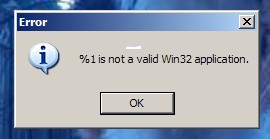
    After installing Instant WordPress on a XP desktop I was disappointed to see that it would not start, it did generate an error (see above image) but the error was obscured by the program’s splash image. The error dialog was not movable using either the mouse or keyboard. I looked in the program’s folder, found the splash image (splash.png) and decided to resize it to a smaller size image so that the error would come into view.

    Instant WordPress

    The error in question was “%1 is not a valid Win32 application.” (see above image). That particular error is often associated with Windows not reading or liking a blank space in some configuration (in many cases a batch file) of the program in question. I decided to move the Instant WordPress folder from the desktop – whose “Documents and Settings” path contains spaces – to c:\ and as expected it worked (see below image).

    Instant WordPress

    Instant WordPress is the easiest method yet to play with WordPress and it comes with a few dummy posts and pages. As of this post it is bundled with WordPress 3.2, MySQL 5.1.46-community-nt with phpMyAdmin, Apache 2.2.15, and PHP 5.3.2.

  • Freeware Shorts: JC&MB Quicknote

    JC&MB Quicknote (Version: 5.5 as of this post) is a little program with a not so modern interface that is nevertheless a useful notes organizer or scrapbook. It offers a few additional tools and an efficient launch method that make it a bit more usable.

    Quicknote

    When installed Quicknote remains always close at hand by placing a narrow gray strip on top of the screen. Just hover the mouse over that strip and Quicknote animates into view. The location of the strip can be changed and also a hotkey can be added for keyboard users (see image).

    By default it offers four note areas where a drawing tool is available as well. The extra features available via either the program toolbar or menu are a calculator, unit convertor, reminder with alarm, program launcher, screen distance calculator and also a ‘send text through a network’. The latter is probably best explained by watching one of the tutorial videos available on the author’s site at http://quicknote.de/help/network.php?lang=en

    The program is still in development as witnessed by activity in its bug tracker page. It should run on all Windows versions.

  • Picture Collage Maker Pro Review And Giveaway

    Comment below for your chance to win Picture Collage Maker Pro from PearlMountainSoft!

    Picture Collage Maker Pro is a fun and useful program from Pearl Mountain Software. With it you can create collages of pictures just to keep as images or as scrapbooks and you may also create greeting cards, desktop wallpapers and calendars.

    Picture Collage Maker Pro

    Upon start up Picture Collage Maker Pro offers four choices on how to proceed. The first method is to start a blank collage. Here one can choose different sizes of paper, greeting cards, desktop wallpaper or simply a custom size. The second option is a template wizard, in this case photos are added and then one of the pre-made layouts (greeting cards, collages, etc.) are chosen. The third option is to create from template, this is essentially the same as the second option but the user will see the layouts first and then add photos. The fourth and last option is the grid collage wizard which lets the user divide a page into equal size grids and then include images in a rectangular grid.

    Once in the program Picture Collage Maker Pro supports drag and drop to add images. Images can then be aligned, resized and rotated. Additionally one may choose a background and it is also possible to add masks, frames, clipart and shapes. All in all Picture Collage Maker Pro is a complete program and it is easy to use (see image for a sample I created in seconds) and comes complete with built-in print capability.