Author: Reza

  • Calendar Magic: Useful, Fun And Educational Freeware

    Calender Magic

    Calendar Magic is not a new program, it is at version 17.7 now and its history can be traced back to 1995. Its interface is not the most elegant but that doesn’t detract from what it offers.

    Some of its features follow but there is more and playing with the program indeed reveals lots more.

    Quick Notes for holding text. 15 numbered sheets are available which can be renamed to more descriptive titles.

    Reminders. Three types are available, one which defines a repeatable day and month alarm. A second that lets the user pick things like every first Sunday of the month and lastly a third type to set alarms for day(s) of the month.

    A reaction timer and stop watch (See Time menu)

    A ‘This is your life’ feature (see Dates menu) which provides a lot information about any birth date.

    Gregorian and 30 other calendars from the likes of Persian Astronomical to Baha’i and more. These can be viewed in ‘dual’ or ‘comparison’ mode to compare days with the Gregorian. Additionally a date conversion tool to show what any date would be in other calenders. Also a ‘number of days between’ calculator.

    A list of holidays or ‘observed’ days for many countries.

    Several ‘Planning Calendars’ that lay out dates in a way useful to bankers, teachers and others.

    Solar and lunar phase and eclipse data for any year up to the year 3000. Sunrise, sunset, moonrise and moonset for many locations.

    World clock to show up to 12 world times together. Many more current local times including distance calculations.

    A rather comprehensive unit converter. Many calculators (scientific, fraction, statistic, Body Mass Index, Ovulation and others) in the Utilities menu.

    Discovering Calendar Magic’s features is a fun exercise. Virtually every screen can be printed and Calendar Magic should run on all Windows versions going back to Windows 95.
  • Clipboard Master: Freeware Clipboard Enhancement

    Clipboard Master

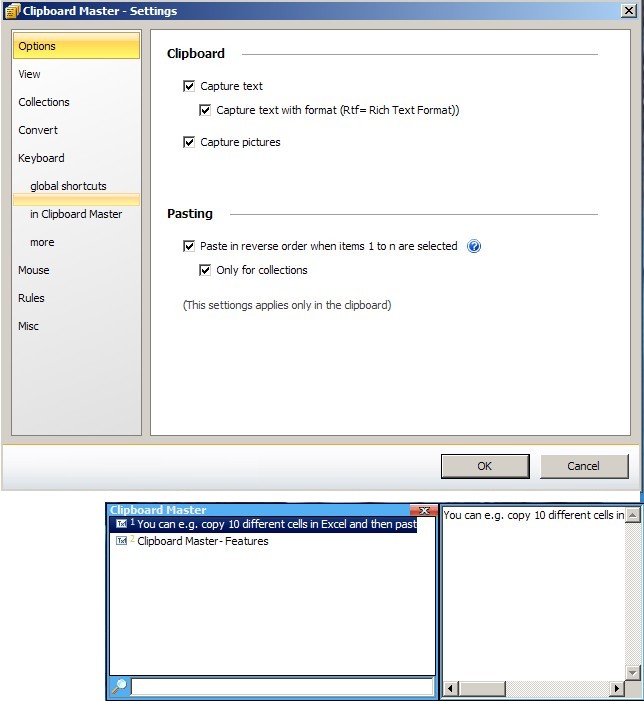
    Clipboard Master is a freeware Windows clipboard utility that enhances and makes copying and pasting more useful. Instead of the native Windows’ one clipboard item at a time Clipboard Master can hold up to 10,000 items, including images, and with a few key strokes paste them into any active application or program window. It uses the Windows + v keys to show a list of clipboard items it is holding, each identified by a number. For example to paste the 4th item into an active window press the Windows + v keys plus the 4 key (or alternatively use the mouse method, ie left click the program’s tray icon and navigate to the required clipboard and click on it). It can retain formatting or not when pasting text, the toggle being holding or not holding the Ctrl button when using either the keyboard or mouse methods just described.

    Clipboard Master comes with a set of extra tools to insert date, remove spaces – clicking on a clipboard item presents this and other ‘convert’ features – and create folders to keep any number of clipboard items together as a related group. It also has what it calls collections, here when successive Ctrl + c clicks are done quickly – less than five seconds in between each by default – they can be added to one collection and pasted altogether using the Win + Alt + F1 keys or via the program’s tray icon.

    Note that as of this review Clipboard Master is in beta (version 0.9.7) which will expire “3/2011” and therefore is not fully complete and some features like creating folders and exclusion rules (in the program’s settings) seem to either be buggy or not ready yet. Clipboard Master runs on Windows 2000 and newer versions including 64 bit ones.

  • MadAppLauncher: Minimize Mouse Clicks When Launching Applications

    MadAppLauncher

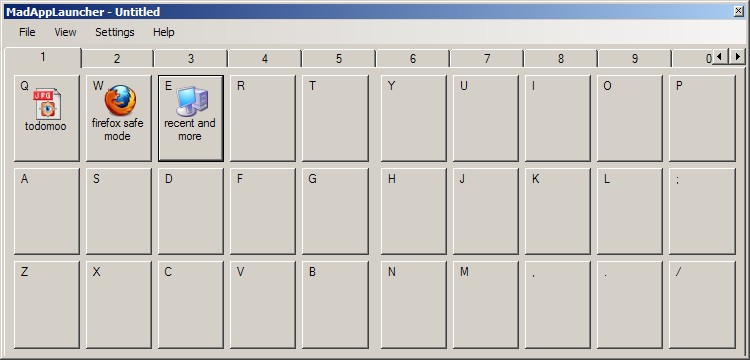
    MadAppLauncher is a free and simple launcher that gets out of your way when not needed. It strives to minimize mouse clicks when launching not only programs but files and folders too.

    Other than using its File menu MadAppLauncher supports dragging and dropping anything (files, folders, programs, shortcuts, etc.) into squares to create a launch space. Its interface is divided into 10 tabs numbered one to 10 each with 30 spaces with their own letter or symbol. To launch any of the shortcuts start MadAppLauncher, either using the tray icon or by using a hotkey (assigned in the Settings menu) then click the number to activate the corresponding tab and then the letter (or symbol) assigned to the shortcut to launch it.

    MadAppLauncher can stay open when working to add shortcuts but go into auto hide mode when in actual use. Another useful feature in its settings is the option to auto activate tabs by hovering the mouse over the tab numbers, this is probably most useful because it may be difficult to remember which tab contains which shortcut and it is a welcome feature to be able to more easily navigate tabs.

    A more advanced feature is the ability to create what MadAppLauncher calls cascading groups. By creating a configuration file one can open any number of programs, files or folders at the same time. A somewhat incomplete but useful explanation is given on the author’s site. Don’t forget to save any current (*.mal file created by using the File menu’s save option) setup before proceeding to create another series of shortcuts or a cascading group. MadAppLauncher is also hosted on sourceforge but I was not able to find its source files. It requires Windows XP at a minimum and is in early stages of development, however it works well.

  • Todomoo: Open Source To Do List

    Todomoo calls itself a todo manager. It is primarily aimed at keeping track of schedules for paid projects but it can be used as a simple to do list as well.

    Todomoo’s interface is a tab like presentation with each category having its own tab. Tasks belonging to each or all categories can be viewed by clicking on their respective tabs. Tasks are added via the New Task button (or from the program menu: Task —> New Task) and assigned a category, name, description, color and priority. Additionally the new task window offers options to add creation, due and completed dates plus a timer to keep track of time spent on the task. Keeping track of payments is made easy by assigning per hour rates and a due date. Multiple notes can also be added to tasks with the tabbed interface indicating how many notes exists for any particular one.

    Todomoo also supports sub tasks. These are made somewhat more useful because sub tasks can keep their own timers and payment details separate from the main or parent task. Those details can then be added and included when a parent task is complete.

    Tasks can be exported to a *.csv (comma separated value) file. Todomoo can keep backups of its SQLite database. It is available in both installer and portable versions.

  • MemPad: Freeware That Is A More Than A Note Organizer

    MemPad

    MemPad calls itself a text outliner. It is more precisely a freeware 140KB download which is a notes organizer, one which stores notes in a tree structure.

    It offers basic features for fonts and colors, auto save – in minutes increments and/or automatically as text is entered – search (and replace) across all notes and the ability to export notes. It does have some more advanced features like internal linking between notes (highlight and right click to create links) and linking to system files or programs which can be used to launch anything from web links to executables from within MemPad.

    With a F6 click (or Page —>Diary Page) MemPad creates a diary page for the current day and therefore it can be used as a structured diary program. It is also possible to move nodes and child nodes or pages up and down to restructure the tree. Additionally a page can be locked to provide temporary protection against accidental edits, a sort of read only format. It is also possible to encrypt a page to keep it away from prying eyes.

    MemPad can do more via the Lookup.txt and Launcher.txt files found initially in its Examples folder. The chevron button on the far right of MemPad’s toolbar can be turned into a launcher by populating the Launcher.txt file with statements like Calculator;calc.exe for example – to launch the system calculator. Lookups, done via right clicking highlighted text, can be added with entries like Wikipedia;http://en.wikipedia.org/wiki/$ for example – to look up the highlighted word in Wikipedia. Note that to use the lookups and the launcher the Lookup.txt and Launcher.txt files must be moved from the Examples folder to Mempad’s root folder.

    MemPad is more powerful than its size or ‘text outliner’ description may indicate. Its help file has more, from how to modify text margins and date formats to how to more efficiently work with its launcher and lookup features.

  • Chit Chat For Facebook

    Chit Chat For Facebook

    Chit Chat For Facebook is a free application to use in place of Facebook’s in browser chat popup. It includes a few additions to make it worthwhile if you are a regular Facebook chat user and would rather not always have a browser window open for chatting. After installation the user simply logs in using his or her regular Facebook details and is presented with a tabbed interface not too unlike MSN’s Live Messenger interface.

    Its options – accessible via Tools —> Preferences – include a chat logging option (enabled by default), configurable shortcuts for many actions, sorting contacts and changing the fonts and looks of the chat itself. Chit Chat For Facebook can send messages to friends and be used to write on their walls. One can also update his or her own Facebook status.

    When installing it offers to install a browser plug-in, the AutoComplete Pro, which can be refused. It also offers to announce itself, via a status update, to your friends, again this can be refused. Chit Chat For Facebook requires Windows XP at a minimum.

  • 5DFly Free Photo Editing And Viewer

    5Dfly Free Photo Editing And Viewer

    5DFly is a freeware image viewer with a set of basic and few extra and useful features. It loads single images (after double clicking them) into a tabbed interface making working with several images easier. It supports creation of slideshows in powerpoint (*.ppt and *.pps) formats. 5DFly also has built-in support for uploading pictures to Flickr and Facebook.

    5DFly can convert an HTML page to an image. Here the user enters an URL which the program fetches to an internal viewer and generates an image from. This, in effect, is an alternative method for grabbing web page screenshots, one which grabs whole pages all the way to the bottom without the need to scroll down for longer pages.

    The more readily available elsewhere features of 5DFly are batch processing for resizing photos and others like converting to gray scale, cropping freely or to predefined sizes, rotating, removing red eye and others.

    Of further note are the history features available in the individual image view which lets the user undo any operations done on the image and also a web page history to keep tab on sites visited (for the *.html to *.jpg operation for example) using the program. Copying images to the clipboard and setting them as wallpaper are also possible with 5DFly.

    Upon installation 5DFly associates itself with *.jpg and other image formats without prompting the user for input and it sports a Mac-like theme or skin. These two shortcomings will not be held against it today however!

    5DFly runs on Windows 2000 and newer versions.

  • Freeware UK’s Kalender Helps You Stay Organized

    UK's Kalendar

    UK’s Kalender is a no frills program that is a calendar, to do list and event reminder in one. It presents a list view for to do items independent of events that can be entered into the calendar which itself is available in week, fortnight, month and year views.

    UK’s Kalender minimizes into the system tray to always be available for reminders and their associated popups. These alarms also have a snooze function. Events can have templates – complete with icon and color choices – and categories associated with them and UK’s Kalender supports recurring and multiday events. Tool tips, when hovering over events, show the complete event information.

    Double clicking inside any day or in the to do list triggers the window to enter the details of an event and choose its looks, start date, end date, alarm settings and for the to do list also its priority setting. Both the to do list and calendar events also support attachments which will be opened or executed with the event and therefore turn UK’s Kalender into an automatic task scheduler.

    UK’s Kalender has a useful search and filter function to pin down specific events, it can do text back ups and export to a comma separated value (*.CSV) file or an HTML file. It supports holiday information via additional downloads. It runs on Windows 98SE up to Windows 7.

  • kuView: The Lightweight Image Viewer

    kuView

    kuView is a free and opensource lightweight image viewer which tries to aid the user in collecting and managing photo and image collections. The version tested for this review, admittedly a ‘pre’ (1.7pre [178]) release, is not bug free and not the fastest. For example the thumbnail panel (available via the Panel menu) is not always populated with the images of a highlighted or chosen directory.

    kuView supports copying, moving, renaming and printing images. Re-sampling algorithms such as Lanczos and reading metadata and EXIF information associated with a photo. It can also rotate and set an image as wallpaper. One can also view directories as a slideshow, favorite a directory and move between directories, not only levels up and levels down but in ‘history’ mode as well, all using the Traverse menu.

    Two additional features less common to image viewers is the ability to manage a Picasa Web album or gallery from within kuView and also to view, complete with thumbnails, images inside an archive (*.zip, *.tar, *.gz). It also supports reading RAW images.

    kuView is unicode capable, has a set of command line interface options and is availabe either as an executable or a full blown installer. It should run on all recent Windows versions.

  • Freeware P2Do Is A Simple To Do And Task List


    P2Do is a lightweight to do and task list that also provides a monthly calendar view in addition to its main list view. Tasks can be added and placed into categories and assigned tags or subcategories. After adding a task double clicking its entry in the list view will launch the window to add the aforementioned categories, tags or due date. Assigning priority and choosing icons are also done in the same window. The default and limited category and tag options (‘Main’ and ‘Relax’ just to name two) can be expanded within the program settings (lower left of the program interface) by adding one’s own.

    The calendar view is capable of showing only tasks that are given a due date, at first thought this is perhaps a limitation but it is ultimately obvious why. It is also possible to search through tasks, P2Do should run on all recent versions of Windows and is available in both 32 and 64 bit versions and a portable version as well.