Author: Reza

  • (Poll) To review or not to review

    I have been contemplating the amount of time and energy it takes to properly review or write about software on a consistent schedule.

    Please consider voting below and leave a comment too!

    (* The 4th option might make the site more manageable time-wise.)

    Should I continue reviewing software?

    View Results

    Loading ... Loading ...

  • SnapCrab: Freeware Screen Capture

    SnapCrab is a feature rich screenshot capture program. Other than the various capture options one can send screenshots directly to Twitter, Facebook or Evernote.

    SnapCrab

    SnapCrab’s interface is a simple bar. Various capture options and program settings – the gear button – are accessed on the bar or by right clicking the program’s tray icon. From left to right the bar buttons are Capture window, Capture top level window, Capture whole desktop, Capture selected area, Post (to Twitter, Facebook or Evernote), Get color code under cursor (by default RGB and Hex values are copied to the clipboard but this can be changed) and Settings. The settings include back ground options such as transparency and fill color and others like inclusion of cursor and disabling hot keys. The hot keys are Alt+Print Screen for Capture Window and Print Screen for Capture whole desktop. Settings for all other actions such as Capture selected area, Post to Facebook, Save a capture in, Post image and tweet can be configured via Details –>Hotkey.

    SnapCrab’s other settings, found by clicking Details, are configuring capture output location, (image) format, name, sound, timer, ‘capture the active monitor’ and automatic shrinking or resizing of the capture.

    Captures can be named in various ways. SnapCrab comes with  “SnapCrab_{title}_”yyyy”-“m”-“d”_”h”-“n”-“s”_No-“vv, “SnapCrab_”gge”-“m”-“d”(“ddd”)_”h”-“n”-“s”_No-“vv, “SnapCrab_”yy”-“m”-“d”_”h”-“n”-“s”_No-“vv, “SnapCrab_”yyyy”-“m”-“d”_”h”-“n”-“s”_No-“vv, “SnapCrab_”yyyy”-“mm”-“dd”_”hh”-“nn”-“ss”_No-“vvvv and “SnapCrab_No-“vvvv. These are listed as such with the quotes creating confusion. Most are likely obvious however v represent increments starting from 0 and gge is year.

    SnapCrab

    The post to Twitter option requires authenticating from within the program. Facebook and Evernote also require authentication of course however SnapCrab opens a browser instance to prompt for details.

    SnapCrab hot keys can be disabled and the program can remain open but hidden by unchecking the Use Hotkeys option. In this case the program’s tray icon turns gray. SnapCrab is brought to you by the developers behind the Sleipnir browser and runs on Windows XP and newer.

  • Giveaway: Tenorshare Data Recovery Standard

    The giveaway has now ended, winners will be contacted shortly, thanks for participating.

    Comment below to win a copy of the Tenorshare Data Recovery Standard valued at $29.95!

    Tenorshare Data Recovery Standard is a straightforward tool to recover deleted files and not only files – documents, photos, video or music in 100s of formats –  from an internal hard drive but also from USB flash drives, media cards and any FAT or NTFS system. It also supports recovering damaged or formatted partitions and files in them.

    Tenorshare Data Recovery Standard

    Tenorshare Data Recovery Standard has four methods or modes of recovering data. The first three do a specific job and a fourth uses a deep scan algorithm that is often more successful in recovering lost data. The modes are Deleted Recovery, Format Recovery, Partition Recovery and Raw Recovery.

    They are described as follows:

    Deleted Recovery: Recover any deleted data
    Format Recovery: Recover formatted files or partition with original file name and path.
    Partition Recovery: Backup, restore and recover partition table
    Raw Recovery: Perform data recovery with deep scan.

    The first mode is relatively quick and presents its findings – with preview where possible – and the option to choose which ones to recover.

    The second will try to recover files from formatted partitions and external drives and cards.

    The third, the Partition Recovery, will rebuild damaged partition tables. It will also back up and restore partition tables and scan for data in them.

    The fourth and final mode, the Raw Recovery, is for ‘seriously’ damaged files and is mainly meant to be a last resort. This will take longer. For example the raw mode found over 4000 files to recover (see image below) and much like other modes categorized them by format.

    Tenorshare Data Recovery Standard

    A complete help page with many more screenshots can be found at http://www.any-data-recovery.com/screenshot/datarecoverystandard.html

    Data Recovery Standard should run on all Windows versions.

    Activation will be handled by the software author and the cnet download version should be used.

  • Wolfcoders ScreenSnag: Freeware Screenshot Grabber

    Wolfcoders ScreenSnag is an attractive freeware screenshot grabber.

    Wolfcoders ScreenSnag

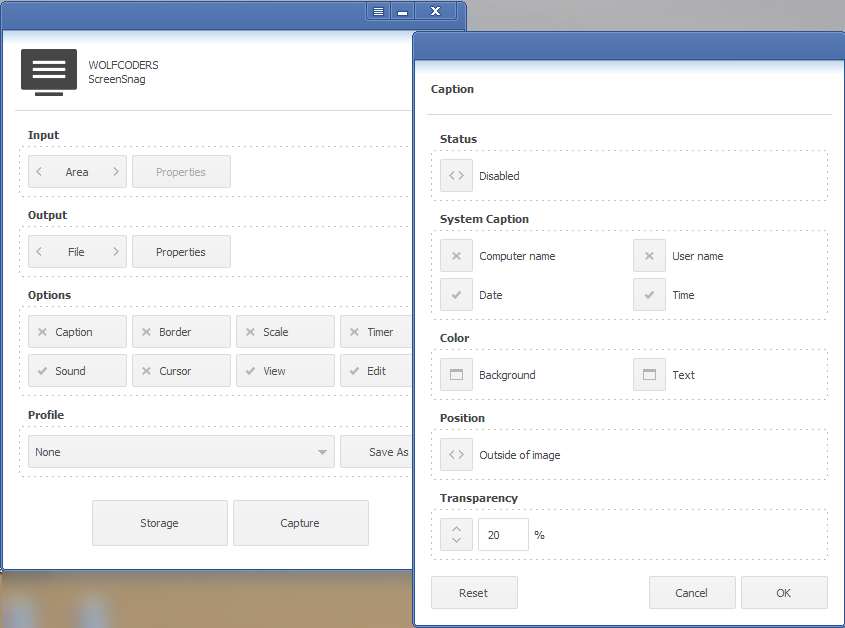
    Wolfcoders ScreenSnag works by enabling or disabling a number of options via its window and then proceeding to capture. The first option is to choose the ‘Input’. Here choose one of capture window, full screen or area. The corresponding properties button is for choosing a transparency – current or clean – for the capture. The ‘Output’ is a choice between a file and the clipboard. The file option has properties for choosing the file format – png, bmp or jpg – file name and quality.

    More options are available to customize the screenshot. Caption is like watermark and includes automatic text in computer name, user name, date and time. Colors and transparency for the same text as well. The caption or watermark can be placed outside or inside the screenshot.

    Border and scale customize the size of the output further. The cursor can be visible or not. Timer adds a delay to complete the capture. Sound – to remind that the capture is complete – can be turned off and ScreenSnag can automatically open the capture in the default image viewer or editor.

    Wolfcoders ScreenSnag

    The Storage button opens the output folder and the Capture button does the actual task of grabbing the screenshot.

    The program’s settings (the button to the left of  minimize) includes starting the program with the system and enabling global hotkeys, among others. The hotkeys are limited and are not configurable however (see image.)

    ScreenSnag runs on XP or newer.

  • Freeware Launcher: Mouse Extender

    Mouse Extender is a freeware launcher for mouse users, it seems that its development has stopped but at its last or current version (1.9.9.3) it is still a useful tool.

    Mouse Extender

    The default method of opening the program is the middle mouse button (or the F4 key) but this can be changed via the program’s settings.

    Mouse Extender can launch files, folders, programs or web sites – it features proxy support for the latter. It also comes with (double click) buttons for the system control panel, reboot, shutdown, hibernate or sleep.

    Right click on the program’s interface to add shortcuts or to add a tab (see image) to organize shortcuts. Right click on an icon to edit its target – to add arguments, to change its icon or working directory. The same right click can move or send shortcuts to different tabs to reorganize them. The option to ‘Add Running Program’ makes it easy to add a shortcut from a list of open windows, to save clicks.

    The exclude option is also very useful, for example adding Firefox to the exclusion list frees the middle mouse button for Firefox’s use.

    If the program was being further developed one suggestion would be add captions to shortcuts since in the case of a folder one must rely on its tooltip to remember which is being launched.

    When starting the program’s its update check fails, presumably because the program is not active, but this can be ignored. Mouse Extender does not require installation, it does however require .NET Framework 3.5 SP1. Works on XP and newer.

  • Ultimate Calendar Is Now Freeware

    Recently site visitor Asen (thanks Asen) alerted me that Ultimate Calendar is now freeware.

    Ultimate Calendar (Version: 1.5.1.5) at its basic level is simply a calendar display – with a monthly or yearly view – but it has a fair of number settings that make it more than that. The program’s settings are accessible from the right hand side of the program with holidays and user added events, notes or ‘personal dates’ also listed under the calendar.

    Ultimate Calendar

    Events can be added and a sizable set of country specific holidays can be toggled on and off via ‘Dates sets’. ‘Displaying’ offers several configurable methods of showing dates, one can choose to show four digit year with %Y or numeric month with a leading zero with %M for example.

    Use ‘Calendar’ to set the first day of weeks,  if needed change the weekend days from the default Saturday and Sunday, change the three row display or display weeks vertically instead of horizontally.

    ‘Dates list’ changes the number of rows of holidays and events on display under the calendar and can filter them from all available to those within X number of days from today’s date.

    To set what is shown when the mouse hovers over Ultimate Calendar’s tray icon change the ‘Popup window’ settings. Transparency and the aforementioned events within X number of days are available here too.

    ‘Face’ is the place to change the theme of the program and separately colors, fonts and alignment of the events list.

    It is not very obvious why ‘Priority’ is useful, when two events coincide on the same date one can change which is shown first or given priority. In my tests I added a note for a day (see November 11th in the screenshot above) and then changed the priority of ‘Notes’ to the highest level. The note I had added just showed one cell above others of the same date and when I hovered over a date on the calendar itself. ‘Limitation’ works in the same vein and lets the user hide certain elements from the events list or calendar display.

    ‘Plugins’ adds Julian dates and Sun and Moon information and can be configured by location, country, town, latitude and longitude.

    ‘Export’ has several options that include ‘Export to Excel’, ‘Save as bitmap’ and ‘Save dates list as’ Text, RTF or Text UTF-8 (Unicode). Finally ‘Program’ has the autostart with system and minimize to tray settings and ‘Language’ is the place to override the default system language. Ultimate Calendar should work on Windows 2000 and newer.

  • BabelPad: Feature Rich, Unicode And Freeware Text Editor

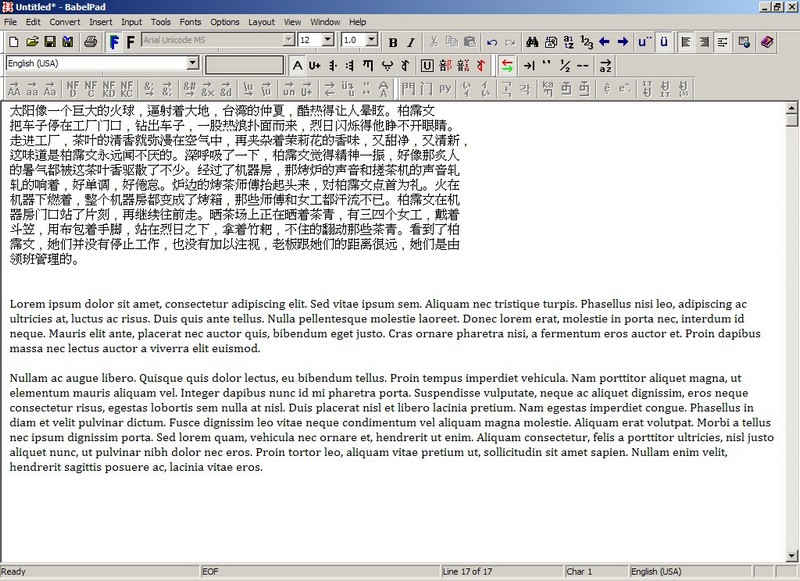
    BabelPad (Version: 6.2.0.3) is a text editor or word processor that comes with a lot features, especially if Unicode, fonts or foreign languages are concerned. BabelPad supports rendering to make different language display properly, in particular it uses Microsoft’s Uniscribe services. It is made to ease rendering of different fonts, simplified and traditional Chinese for example. It supports CR and LF new line formats, left to right and right to left layouts, encoding like UTF-8, UTF-16, UTF-32, ISO-8859-8 (Hebrew), ISO-8859-6 (Arabic), Windows CP 1258 (Vietnamese), EUC-JA (Japanese), TSCII (Tamil) and many more and saves files in some and auto-detects them in many cases too.

    BabelPad

    Other features are drag and drop files, multiple undo/redo and an option to auto-indent text as you type, open large files and not only do a normal find and replace but batch replace whole series of words (Edit —> Batch Replace). Text conversion is another part of its strength in Unicode. It can convert case for multiple encodings and languages, between simplified and traditional Chinese, HTML entities to Unicode characters and lots more like it.

    Other tools included are font coverage, analysis and information to provide info about an open document or any section of one. An advanced character frequency and character map with 1000s of character and symbols. An Advanced Character Search tool (Tools —> Advanced Character Search) where it can scan an open document for every kind of character combination one can come up with (see image.)

    BabelPad

    BabelPad is less than a 3MB download and the few words above are just scratching the surface of the number of options available. It can run on Windows 2000 and newer and is made available in a portable version by portableapps.com

  • Freeware Calendar: Desktop iCalendar Lite

    Desktop iCalendar Lite (Version: 1.9.6.1) is a small calendar and to do program that sits on the desktop. Its lite version features to do and event lists besides its configurable calendar. It supports multiple calendars so one can have public holidays, personal calendar (including iCalendar support) and public google calendar displayed together.

    Desktop iCalendar Lite

    Using the plus buttons – visible when hovering over their respective windows or sections –  one can add events and to do items. Events can have summary, description, date range, category (icon), alarm and recurrence. To do items can have summary, description, start and due dates, category and reminder. Calendar days with events are shown in a different color. Hovering over a day with an event offers a tool tip style summary of the event and clicking on a day with one shows the text associated with the event inside the events docked window.

    Several themes are available. Font, color, background and transparency of each can be configured to make it more individual. The to do and events windows can be turned off in the program’s settings.

    Desktop iCalendar Lite should run on Windows XP and newer. Note that while testing it I noticed that it was trying to sync – the tray icon would change – when there shouldn’t be anything to sync with. Using the tray icon menu —> Calendars I turned off all calendars except the local one created for testing but it seemed to try to want to sync.

  • Aimersoft Video Studio Express Review And Halloween Giveaway

    Video Studio Express is one of the many easy to use software from Aimersoft. I received the news that the developers are having a Halloween giveaway of the program – which normally costs $35 – along with discounts on some of their other programs. A brief review of the Video Studio Express follows.
    Aimersoft Video Studio Express

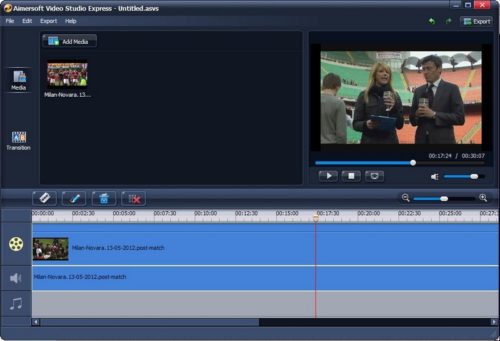
    As always working with such tools begins with importing the media, using the Add Media button. Video Studio Express supports most input formats including those from iDevices and others like AVI, MOV, MP4, MPG, MKV, FLV, WMV and audio formats like MP3, OGG, WMA, FLAC and others.

    When importing one or more videos drag them to the time line and you will notice they can occupy any place in the time line so a video can start from any moment in time with its (if any) audio linked to it. If there is no audio the background music section, lower most on the time line, can be edited to add your own.

    When more videos are added transitions can be added by using the Transitions button. Many are available to make the completed video look more professional. These include blind, merge, column split, drop, roll, wave, wind and others. A preview is shown when any one of the transitions is clicked. Optionally gaps between video can be removed using the Remove All Gaps button which is the right most one above the timeline. There is a split option as well. It is done by dragging the ‘indicator’ anchor to a point on the time line and clicking the Split button.

    Click and highlight either the video or audio and click the pencil like edit button. Audio can be lowered and faded in or out. The video can be rotated, resized and its aspect ratio changed. Its brightness, saturation and contrast can edited. Additional available effects are emboss, gray, negative, old film and various deinterlacing methods.

    When done click the Export button on the top right and choose device, format or Youtube. Videos can be saved for iPhones, iPads, PS3 and others or in one of many formats like mov, wmv, mp4 and even DVD PAL, SECAM and NTSC. It is also possible to upload videos directly to Youtube by providing login, title, description, tag and category details. Videos can be saved locally as a project as well.

    Video Studio Express should work on Windows XP and newer. A Mac version is available too.

  • Greeting Box For Mac: Free Printable Greeting Cards

    If looking for an app to create, print and share greeting cards the free Greeting Box for Mac is a capable option. It has an easy to use interface with instant previews and templates that offer a good amount of personalization.

    Greeting Box for Mac

    A number of templates are available for different occasions and holidays. Photos can be inserted on the cards and can be dragged and dropped, rotated, positioned and edited with clipart, text, frames, masks and other effects.

    It is possible to just save the greeting cards as images, shared or printed ready for folding and save settings as projects for re-use later too.

    Check the tutorial pages for step by step details. Samples are also available there to give a better idea what Greeting Box for Mac is capable of.

    Greeting Box for Mac requires Mac OS X 10.7 and is available at the App Store.