On March 28th at 8:30PM local time switch off all lights for 60 minutes. Join thousands of cities and millions of people all around the world and tell your friends.
Author: Reza
-
Know Your System Better With Startup Control Panel
One of the ways to see which process(es) and program(s) are taking over your system is to look at which starts along with your computer. Windows Start menu has a Startup shortcut that shows the often legitimate programs that start for the current or all users.
Startup Control Panel and StartupMonitor by Mike Lin add to the arsenal of useful and simple tools that give computer users a better picture of their system. They provide powerful yet lightweight means of viewing, controlling and detecting possible resource hogs and even security threats.
StartupMonitor at a 60KB download runs in the background and is only seen when a program wants to add an entry to the system’s startup. Sometimes such an entry may be necessary, may be a program such as a calendar has to be visible or running all the time, in which case the change or addition can be accepted with one click. At other times the program may be suspicious or not wanted, when for example a program wants to call home to retrieve updates automatically, and here a simple No click will do the job. StartupMonitor will add an entry to the Windows Start menu to stop it running, if needed.
Startup Control Panel at a 34KB executable (to be installed) or a 59KB zip file (run straight after unzipping) download on the other hand has an interface. It is divided into tabs that let the user view virtually all entries in the system’s startup. The tabs are Startup User which shows the items for the current user, Startup Common which shows the ones for all users, Run Once which are those that can occur when a program or report is installed or generated and needs to run at the next system startup only, HKEY_LOCAL_MACHINE for the registry entries affecting all users when programs add a startup entry to the Windows registry and HKEY_CURRENT_USER for the registry entries affecting the current user.
Each entry can be viewed in the control panel and unchecked to not run or simply be deleted to not be seen and be sent to the program’s Deleted tab. Much like looking at the aforementioned Startup shortcut provided by Windows some of the tasks acheivable by the StartupControl Panel tools can be done when accessing Microssoft’s own MSConfig but Startup Control Panel offers a more complete picture of what is happening. One additional feature is that it is possible to send an entry to other tabs via one right click. Sending to different tabs simply means, for example, that a process can be sent form Startup User to Startup Common and therefore allowing it to run for all users.
Startup Control Panel and StartupMonitor are two extremely worthy free downloads from Mike Lin.
-
Help The Environment With The Climate Savers Computing Initiative
I do not know of a person or organization who doesn’t own or use computers or appliances that bear the Energy Star logo or who do not use their computers’ power management features such as those that turn off the hard drive and monitor after a set of amount of time. However the Climate Savers Smart Computing started by Google and Intel is taking that baseline further and in conjunction with Energy Star’s newer 4.0 specification has launched an initiative in the hopes of taking more steps in reducing CO2 emissions. The effort is mainly aimed at buinesses but consumers influence the initiative as well by buying products that support the standards and by using the power management features of the products they buy such as the aforementioned and well known feature native to most if not all computers. To make the consumer side further appealing a video challenge has been set up with a chance to win $5000 and other prizes. See video below.
-
Clipboard Help+Spell From Donationcoder.com
I wrote about the Donationcoder.com’s website in a previous article and one of the more impressive and useful software written there is the Clipboard Help+Spell.
There are certainly many freeware, well reviewed, useful and popular clipboard utilities available. The sadly semi-abandoned Yankee Clipper, the open source Ditto and ArsClip just to name three and of course the clipboard capabilities of the all powerful PowerPro.
Clipboard Help+Spell is nevertheless a worthy contender, if not down right winner in the category. It is simply described as
…a text-based clipboard utility
But it has many features. Among its many features is the ability to archive and delete clipboard based on configurable dates, defining hot keys for viewing, pasting and working with the stored clipboards, filtering entries to find the forgotten ones and backing up the database of collected clipboards. The features don’t stop there, an internal editor spell checks and adds text editor features to manipulate the entries as well. For example it possible to change the case of the clipboard entries within the editor, strip characters, add lines and even find and replace words using regular expressions.
A clipboard utility won’t be complete without the ability to permanently store ‘favorites’ and in this case it is only a matter of dragging an entry into the said category (see images below).
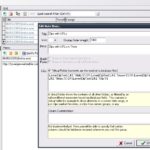

Having said all that one of the most innovative features is the ability to create ‘Virtual Folders’. This feature allows certain definable clipboards to be grouped separately. For example a preset Virtual Folder is ‘Clips With URLs’ and the way it is defined, using SQL database conditional statements, is as follows
(Lower(ClipText) LIKE ‘%http:%’) OR (Lower(ClipText) LIKE ‘%www.%’) OR (Lower(ClipText) LIKE ‘%https:%’) OR (Lower(ClipText) LIKE ‘%ftp:%’)
in that the clipboards containing any of http, https, ftp or www will be placed as a subset of all clipboards under a separate icon (as shown in the above image).
The program’s Windows tray icon is configured such that left click, double left click, right click and double right click are all defined and show stored clips, the program’s main window, the program’s general menu and the program’s on and off toggle respectively. With Clipboard Help+Spell there is a lot to play around with and discover, well worth the support and download.
-
Donationcoder.com
Donationcoder is an active and unusual website. It is a one where not only members get help on computer and programming issues but one where useful code and programs are being written and reviewed everyday. What makes donationcoder even more unusual is the section they call ‘Coding Snacks‘. This is where you get ‘Tiny programs coded on demand while you wait’. Through this and other active members and authors donationcoder has, over the years, accumulated a vast array of programs made for a wide variety of useful tasks. Some minor and some pretty innovative and even more useful. Software creation challenges such as the yearly NANY (New Apps For The New Year) challenge have also added to the list of programs available.
Right now a 4th anniversary fundraiser has been setup with the aim of raising $8000 to cover all kinds of costs and any amount of money donated will entitle the donator to a non-expiring key to all the software created and even those that will be created in the future. Other benefits include full access to their shareware discount deals and more.
But most of all donating is a way to support donationcoder, a place where members are helping each other in very concrete means. For a fun, tongue in cheek calculation of how much a person can and should donate check out the Scientifically Proven Optimal Donation Amount Chart.
-
White Spaces Internet
White Spaces internet is one of the latest and perhaps most promising and close to reality internet technologies. It is supported by many of the biggest industry leaders such Microsoft and Google through alliances such as White Spaces Coalition and Wireless Innovation Alliance but also grassroots and non-profit groups that are closer to the consumer’s need such as Free Press that campaigned for it when the FCC was considering White Spaces.
White Spaces refers to the use of an empty part of the broadcast spectrum that can be made available for other use. This year in the United States and soon in Canada television stations will cease to broadcast in the 700Mhz range and some consumers will need to use the much publicized digital convertors. That broadcast range has already been tested and approved by the FCC to deliver high speed internet. Years of TV viewing have shown the usability and range of TV broadcasts and how that signal penetrates walls and travels through obstacles. This characteristic makes the (up to) 700Mhz range almost ideal for internet delivery.
With that potential seemingly close to realization there is a promise of cheaper and better internet access that may even be able to deliver 40Mbps – easily 8 times more than most current offerings – speeds in the near future. Most consumers having been forced into limited speeds, poor support and limited infrastructure by traditional telephone and cable companies have to be happy with a new technology that seems to hold real promise. Devices to deliver this, while not fully defined or publicized, are near and should be available in the not too distant future.
-
50 Ways To Help The Planet
50 simple things that can be done every day to live a greener life. (click on image to see them all)

-
Internet2, The Next Generation Internet
Internet2 is a concept born in 1996 as the needs of some universities and institutions where not being served by the traditional internet. Some universities met and decided to implement a non-profit internet that would provide high speed and high performance links for their use. The possible start back then was a 2.5Gbps network but that has since been upgraded to 100Gbps links.
One high profile usage is the CERN Large Hadron Collider coming fully online this year. Using this network scientists can work with what they expect to be 15 million GB of data generated annually by the LHC.
Initially Internet 2 worked by using a software detective that relayed a packet to a server to check the connection and bandwidth and then the time it took for a returning packet to get back to the sender was used as a means of confirming the suitability of the connection. Now Internet2 mainly works by allowing those who use it to set up temporary networks, called Dynamic Circuit Networks, to have access to very high transfer and performance rates for periods that they need it.
Such large bandwidth has many applications like videoconferencing just to name one, it is also being tested using IPv6 and developing the next generation of 911.
Since the danger is that they have created something that will cost more to access and use the advocates and project collaborators insist that they are for network neutrality, that is they oppose extra fees and charges to access certain networks or ‘parts’ of the internet that are faster or deliver more content.
Lots more to read about this promising present and future at the Internet2 website, at Wikipedia and articles such as this at Internet Evolution
-
Text File Stats & Watermark Images
Two GNU licensed freeware courtesy of Lune Rouge offer easy and lighweight means of achieving sometimes useful tasks.
Firs off line TextStat described simply as
Create statistics on a text file
Using it is as simple as browsing for a file and then clicking the “TS” icon. Using TextStat it is possible to analyze any text or HTML file and generate wide ranging info. Among others TextStat produces stats on the number of words and paragraphs to such things as number of carriage returns, number of occurances of every word and an estimate on the number of syllables. TextStat supports such options as exluding words and separators like question marks (see image below). The results can be viewed in the program itself, copied or exported into a text or HTML file. An additional tool is the calculation of the Flesch Reading Ease test or score which calculates the readability of the text based on the number of words and syllables per sentences and words respectively.
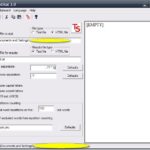
Next up is CopyrightLeft described as
…add a copyright on or below your images
Also GNU licensed, CopyrightLeft offers a no frills way to add watermarks to any image. It offers the needed options such as color, text position, rotation and transparency and even more (see image below). What makes this 799KB download even better is its batch processing. It is possible to force the output format of watermarked images, such as converting images to .jpg, and also one can create a HTML file with a linked listing to the said images. It has worked well for me except in one case. If the option to add ‘Shadow’ or ‘Glow’ is checked and the watermark text is rotated the shadow and glow remain at zero degrees and do not follow the text orientation. Sometimes, but not in all my tests, checking ‘Transparent background’, as if to hide the glow or shadow, solves this issue.
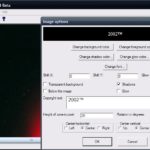
Both should work in all Windows versions.
-
Enware Freeware & Dirhtml Index.html Generator II
Shortly after I wrote about the dirhtml index.html generator I received an email from its developer. In part due to my confusion about the way the sorting options were presented and how the output listing was actually sorted Eric, the enware developer, had released a new, then beta, version. It has since gone out of beta and v4.833 presents a more intuitive sorting menu (see images below).
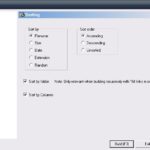
Older version of dirhtml 
New version of dirhtml In my opinion it is now easier to visualize the output because the ‘Unsorted’ option is now in a column with all the primary choices that determine the shape of the output.
Two notable omissions in the original article were that at the ‘Input/Output’ and final tab it is possible to create a batch file by clicking the ‘Save Batch File’ button or F7. This will generate a batch file and an associated .ini file. Launching the .bat will use the .ini file, containing all the settings that have been gathered by going through the program, and this will then immediately generate the required output. This is very useful as it makes subsequent uses much easier and faster. Also worth pointing out is the ‘div_recursive.txt’ script, one of the ‘Script’ choices in the initial ‘Folders, Files’ tab. This will generate an output with a recursive listing of the folders and files being worked on. It is a very useful way of presenting the results.
I also want to take this opportunity to write about the other freeware Eric is and has worked on.
First up is the Mp3 ImageMap. This is free for non-commercial purposes and portable. The developer, Eric, describes it as
…an attempt to bring back the shock value of music finding to people who know all their tunes and searches by heart, and incorporates a rather unique algorithm for dividing rectangles into N squares.
It works by the user specifying a folder (containing MP3 files for example), file extension(s)(MP3 and WMA for example), path to the output HTML file, image (GIF, JPG, JPEG or PNG) and choosing one of several sort types and then clicking ‘Build It’. The app will use the image to generate an image map with different areas linked to the different MP3 and WMA files. A nice and fun way to listen to music or simply launch files.
Next is the ScrapBook described as
ScrapBook is a freeware, unstructured database program that holds chunks of text.
A lightweight and only 252KB download, it is surprisingly useful. It is possible to save all sorts of text with the first line of the said text acting as an index. It is also possible to differentiate and separate different chunks by placing them in different ‘cards’. To navigate between cards one can, for example, use the left and right arrows or click Alt+L, F2. Even easier is finding text by using the ‘Find’ box. It is also possible to save shortcuts in ScrapBook and use it as a launcher by moving the cursor over the text or shortcut and clicking F12. One interesting feature is the ability to ‘tag’ cards, by clicking Ctrl+space, and therefore making an index or listing even more intuitive by then viewing a list of tags (Ctrl+T). As with dirhtml ScrapBook is filled with useful features.
Finally there is CopyDate, taking a further step in making tasks easier, described as
Copydate copies files, optionally inserting today’s date/time into the copied filename.


