Author: Reza

  • University Fights Climate Change

    In an earlier post here on RGdot I wrote about the initiative set up to fight climate change by pledging to be smarter in use of technology. The University of Maine at Farmington has beat out several other colleges with the most number of pledges on it campus. Read below for the details courtesy of Enviromedia and also about the video portion of the competition whose winner will be announced on May 4th.

    Honor Given to Top U.S. University Fighting Climate Change Through Smart Computing

    The University of Maine at Farmington beat out 18 other colleges nationwide in a competition to recruit faculty, students and staff to pledge to commit to sustainable computing practices. The university won with more than 24 percent of the campus community pledging to power down their computers and support the Climate Savers Computing Initiative’s mission.

    The first-of-its-kind contest significantly helped the environment by collecting more than 17,000 pledges that will offset more than 3,000 tons of carbon per year and save 4.2 million kilowatt-hours of energy. Cost savings will collectively top more than $450,000 a year.

    “The University of Maine at Farmington won by getting the highest percentage of their campus to pledge,” said Pat Tiernan, executive director of Climate Savers Computing Initiative. “Their commitment means they’ll offset 125 tons of carbon per year, save 164,000 kilowatt-hours of energy and more than $17,000 in energy costs.”

    Climate Savers Computing, an international nonprofit organization committed to reducing IT-related energy waste, collaborated with the U.S. Environmental Protection Agency’s ENERGY STAR program to present the pledge challenge called Power Down for the Planet. All university pledge rankings can be viewed at http://www.powerdownfortheplanet.org/view-all-pledge-drivers/.

    “Our success was the result of students talking to other students, faculty spreading the word in classes, student organizations hanging up posters, and so on,” said Tom O’Donnell, Manager of UMF Computer Center’s Network and Server Systems. “Farmington is a close-knit community, and people pull together for a good cause. In fact, environmental stewardship is written right into our mission statement. Winning the Power Down for the Planet contest is another exciting example of our dedication to the environment.”

    Additional Victories
    Nineteen universities competed, with Jackson State University coming in second, and the University of Iowa coming in third. The University of Iowa also received honorable mention for garnering the highest number of total campus-wide pledges with 6,013.

    “Most importantly, there are only winners here because each university’s administration stepped up to join the challenge and implement broader energy-saving measures,” said Tiernan.

    Other participating universities included: Adelphi University; Arizona State; California State University, East Bay; Cornell University; Furman University; Montclair State University; Ohio State University; Pennsylvania State University; Portland State University; Purdue University; UCLA; University of California at San Diego; University of Florida; University of Maryland; University of Michigan; and University of Mississippi.

    Each university is now a Climate Savers Computing member, and participating universities also agreed to make a commitment to use power management on university-owned PCs and agreed to incorporate energy efficiency criteria for future PC and server purchases. Climate Savers Computing, along with each university, is also now a pledge driver with the EPA’s Change the World, Start with ENERGY STAR campaign.

    In a related contest, Climate Savers Computing also issued an open call for videos that would help tell the Climate Savers Computing story of efficient computing through power management. The winners of the Grand University Prize and Grand Prize will be announced May 4 at http://www.powerdownfortheplanet.org/video/. All Power Down for the Planet Video Challenge submissions can be viewed at http://www.youtube.com/group/powerdown.

    For Earth Hour (www.earthhour.org/home/) , Climate Savers Computing held a weeklong promotion starting March 23 and culminating March 28. It resulted in 1,080 new individual Climate Savers Computing pledges. The Climate Savers Computing Web site had more than 19,000 unique visitors on March 28, accounting for the highest single-day count in 2009.

    Climate Savers Computing also helped present an IT Power Management Summit to share how businesses of all sizes can eliminate wasted energy and cost. A recording of the Webinar is available in the Press Room section of the Climate Savers Computing Web site under the Video and Audio section: http://www.climatesaverscomputing.org/news/latest-news/.

    About Climate Savers Computing
    The Climate Savers Computing Initiative is a nonprofit group of eco-conscious consumers, businesses and conservation organizations dedicated to reducing the energy consumption of computers. More than 450 companies and organizations have joined the Initiative since its launch in June 2007, and thousands of individuals have pledged their support. The Initiative is led by Dell, Google, HP, Intel, Lenovo, Microsoft, and World Wildlife Fund. Sponsors include Acer, AMD, Delta Electronics, Fujitsu, Hitachi, Intuit, Lite-On, NEC, Sun and Supermicro.

    For more information and to pledge your support, visit www.climatesaverscomputing.org

  • RealWorld Paint.COM The Complete Image Editor

    A relative unknown amongst the image editing freeware choices RealWorld Paint.COM is a surprisingly powerful and useful application. It is described by its author simply as

    Web-graphic-master’s tool of choice

    RealWorld Paint.COM makes it easy, barring the advanced functions used by
    RealWorld Paint.COM
    true graphics professionals, to scale the heights of the standard Photoshop. RealWorld Paint.COM is more than sufficient for most purposes. On launch the options are to create a new raster image, open an existing image, capture the desktop or open the clipboard stored image.
    Going through the program one finds the usual requirements in crop, cut, zoom, rotate, mirror but also grid of various sizes that can be superimposed on images to make working on regions easier. Other necessities like border, transparency, color and brightness adjustment and not to mention bevel, drop shadow, fill, border, blur are all present and so is a good text editor with features like gradient text effects. The ability to import, export and use masks can be useful for organizing image editing tasks. Of course it is also possible to create layers with various filters and effect and import or export them. Of some importance is the multiple undo and redo available. Perhaps more notably it is also possible to work with photoshop compatible 8bf plugins (see images) and the ability to define, using an included editor (see images), plugins via the use of javascript. One can also use one of the few available or the one already included that takes screenshots. Perhaps a more unique feature to RealWorld is that 
    RealWorld Paint.COM
    by right clicking an image the user can define mouse gestures (up, down, cross, circle, arrow, hourglass and many more) to automate everything from saving a file to shifting its hue.

    More details can be read, discovered and seen by using this less than 7MB download and checking the software author’s wiki. Resulting images can be saved in the usual formats like JPG, GIF, BMP, PNG and others called ‘Layered image files’ and ‘RealWorld image files’ for images to be worked on later while preserving layers and effects much like other porfessional editors allow. RealWorld Paint.COM is compatible with Windows 2000, XP, Vista, or 7 and is also available in a very convenient portable download. It is not to be confused with the better known PAINT.Net application however. On the DonationCoder forums RealWorld’s author explains the choice of the name in the following way

    Yes, the Paint.COM name is controversial, a bit of a joke and something to counterweight the flood of .net apps. I am old school C++.

  • PhotoScape For All Your Image Editing Needs

    PhotoScape is described by its author as

    PhotoScape is the fun and easy photo editing software that enables you to fix and enhance photos.

    The opening screen is an attractive and clear division of functions and features that can also be accessed in tab like fashion on the top of the screen. The program also displays random flickr images but this can be turned off.
    PhotoScape

    The Viewer presents the well known explorer like interface with panes for navigation and preview. From there and via right click images can be set as wallpaper, become part of a slide show, rotated and double clicked to be viewed in full screen mode. In full screen mode a right click presents the aforementioned possibilities plus others like brighten, darken, zoom, and view EXIF info.
    The Editor presents an ever growing number of filters. Most filters, and other effects, can accessed either via the accompanying drop down or by clicking on their respective buttons. They include the very impressive ‘Bloom’ and ‘Blacklight’ filters that give life and clarity to images. Here one can also resize an image, frame it, add line, objects and shapes onto it, apply a mosaic effect, apply free and preset crops, reduce red eye, and even reduce the appearance of moles. The Batch Editor can do all of the above on a set of images.
    Page includes many templates to group a number of images into a page that can be saved. It is possible to drag and resize images to fit them within many sizes, mixes or shapes available. Frames and filters can be added as well to produce imaginative finished pages.
    PhotoScape

    Combine is another form of the Page funtion described above. Here images can be grouped vertically or horizontally to produce a strip or multipage effect. Again many sizing and framing options are available here.
    AniGif creates gif animations of course and with many required controls. Of course the delay between each animated frame can be controlled as well as the background color that fills any emtpy regions when the images are not exactly the same size. Additionally PhotoScape has 7 transition effects and crucially the ability to position images within the frames (center, top-right, etc.). The latter feature is important when the pictures are not the same exact dimensions and, when using some other animators, individual frames can be off relative to the next frame, but not with PhotoScape.
    Print is sort of an extension of Page and includes various forms that let the user visualize different layouts and print images with configurable alignment, brightness and dots per inches (dpi). The finished product can also include such things as the file name under each image.
    Splitter divides an image into different regions, be they configurable number of equal sized rows and columns or widths and heights.
    PhotoScape

    Screen Capture, captures windows, full screens, rectangular regions and copies them to the clipboard or opens them in the Editor. It is also possible to repeat the last capture.
    Color Picker provides the RGB or Hex value of any region via a zoomed and draggable ‘fountainpen’. PhotoScape also keeps a recent history of captured colors.
    Raw Convertor, useful for DSLR camera images, converts raw formats (DNG, CRW, TIFF, etc) to the web friendly JPG. And finally Rename batch renames files with several renaming templates such as including the EXIF date, today’s date, numbered increments and others in the output file names.
    PhotoScape, currently at v3.3, packs many features in a 14MB download and is one of the most complete freeware of any kind. It does not consume too much resources as it remained well under 40MB of RAM usage throughout extended use. As mentioned it is free, looking for donations, runs under all Windows from 98 to Vista, is actively developed and looking for translators as well.

  • XP Syspad Centralizes System Tools

    XP Syspad from the very useful xtort.net site is described by its author as

    Windows system monitoring utility that allows easy access to Windows system information and Windows system utilities


    XP Syspad

    Startup of XP Syspad is on the slower side, especially at first launch as it seems to be collecting relevant info including the running processes list that it present in its main window. Continuous run of the program is not at all memory intensive and it uses well under 10MB of memory. The main attraction of XP Syspad is that it presents over 250 utilities and functions in one central place. Some of the features worth mentioning is easy two click access to such things as the Windows’ HOSTS file, navigating to the Disk Partition Manager, getting an expanded list of recent items opened under My Menus—>Recent, recovering Window’s and Office product keys, finding out the Windows’ installation date and even a dynamic small calender under the ? menu.
    Some functions did not work or not as intended on the tested system (Windows XP Pro SP3), for example System—>List Installed
    XP Syspad
    Drivers and the rather awkward (see image) Network—>Download Internet File. In the former case nothing happened and the latter case google.com’s homepage was the default download and action was taken even when the operation was cancelled.
    Also of note is the list of programs installed (Programs—>List Installed Programs) because the list presented included things like Norton that have long been uninstalled.  XP Syspad must be reading the list or components from the registry, where programs such as Norton are notorious for leaving orphan entries, because certainly such entries do not exist in the Add/Remove Programs section of the system’s control panel.

    Of most use to not so expert computer users but notwithstanding a few oddities XP Syspad an useful utility overall. Requires Windows 2000 or XP.

  • Carbon Neutrality Around The World

    Carbon Neutrality is a concept of reducing or balancing the amount of greenhouses gases released into the atmosphere. Massive evidence points to fossil fuels causing extreme harm to the environment and while some voices of propaganda or even legitimate scientists do not agree the evidence seems to confirm extreme dangers. Even if the dangers are overblown there is no denying that city life where fumes and other pollutants are very much present has detrimental effects on each human’s health.

    Many worldwide or United Nations (and other organizations) sponsored meetings and summits have been convened to reach a worldwide (or close to worldwide) agreement on controlling the release of CO2 (Carbon Dioxide) and other so-called greenhouse gases that at the very least have local health effects. The Kyoto Protocol is the most famous and perhaps the most criticized. It is however local governments and nations that have taken things into their hands and try to do their part in virtual unilateral fashion. Over the past few years Costa Rica, Norway, Maldives, New Zealand and Maldives and some others have set their own targets of becoming carbon neutral under an UN initiative called the United Nations Environment Programme (UNEP). While some concepts such as selling carbon credits might be questionable as to shift the problem elsewhere for cash it is still commendable and necessary that some form of concrete action is being taken by countries that may not even be the richest.

    Costa Rica’s example seems to be the most ambitious by setting a target of 2021, the country’s 200th anniversary, for becoming carbon neutral. Others like Norway have set dates like 2050 as a target. Such things as moving forward and increasing existing hydroelectric power generation, starting or adding to wind power and solar power generation projects are all steps that help and have long term and short term benefits. Other steps such as halting deforestation add to the arsenal by adding carbon consuming plants. Removing pollutants from the assembly lines and the roads help as well.

    As one concrete example one can look to the the introduction of electric cars into a market place. Recently the India based REVA Electric Car Company (RECC) entered the Costa Rican market and will sell its electric car in that country. Initiatives like this that include profits will help bit by bit and the chances of improving our health and most certainly the well-being of the planet are increased.

  • Locate32 Quicker And Easier Way Of Finding Files

    Locate32 is described by its author as

    Locate32 is a file finder which works by indexing all your files on your hard disk drive…

    When launching and using Locate32 for the first time the user creates a database which indexes all files on any drive. The indexing is relatively quick and can even be over in seconds depending on the number of files and folder on the system. Much like Unix systems it stores databases of directory structures and file names making post-indexing searches instant.

    Much like the native Windows’ search Locate32 supports searching by extension, size, creation and modification date. It also supports such search queries as matching whole names only and searching by file and folder name only.

    Locate32

    Database Info can be accessed under the File menu and includes such info as the size of the database and number of directories and files indexed. File—>Update Database is the place to re-run the database indexing when a number of new files have been created and to therefore keep the index up to date. Automatic updating of the database is also schedulable via the program’s settings.

    Additionally Locate32 has numerous settings that allows the user to tweak the program’s behaviour. It is possible to control such things as what happens when the program is closed (for example ‘minimized to tray’) and how the search results are sorted. The location of database(s) can be changed and database for separate searches, searching other drives for example, created. Keyboard shortcuts are also available for such things as activating controls (ie refining search or choosing a search criteria) and launching a database update. Finally the Advanced tab of Locate32’s Settings (see image) lets the user change such things as the Show As You Type behaviour, Logical Operations (inclusion of the + operator for example) and to things like setting another program to open folders. The latter is very useful when the native Windows Explorer is replaced by an alternative.

    Locate32 is compatible with Windows 98, ME, NT4, 2000, XP and Vista, is available as both 32bit and 64bit versions and can be portable.

  • Minipad2, Store Notes, Set Reminders And More

    Minipad2 is a tabbed, lightweight and portable – 305KB download – single executable that can be used as an text editor, note taker, calculator, dictionary and memo or reminder (tray popup without sound) program.
    It is also capable of watching the clipboard and inserting pre-defined text such as time, date, separator and signature – which can be defined via the Tools—>Edit Template menu. New tabs can be created for separate notes and aforementioned included functions. The features such as the calculator, memo and dictionary are available via typing and following a certain format. For example a memo or alarm can be set by typing

    @m1, 15 9:00, write report

    and pressing enter, this translates into a popup reminder every first and 15th of the month at 9AM with the text ‘write report’ (see images for two more examples).

    minipad2

    Other examples and syntax are given in the accompanying help file. Search and replace is also available but in my testing the search only worked on the current visible tab and not all text stored across the many tabs I had open. Another feature of minipad2 is called Special Effect. Effects can be enabled under the Options menu and chosen in Options—>Preferences. The two main effects available are auto scroll and auto hide. The auto scroll rolls up the window leaving only minipad2’s title bar intact. Auto hide, which didn’t perform as expected in my testing and usage, hides the window when focus is off minipad2, much like the feature available with Windows’ taskbar. But as mentioned, in my testing the minipad2 window seemed to want to hide – the animated effect hovered over my monitor – but the minipad2 window didn’t actually go away.

    minipad2

    To use the dictionary one or more chosen languages must be added via the Preferences menu after they have been downloaded separately. Currently Chinese, Spanish, French, German and Japanese are available.
    A very interesting application with a couple of unusual features and different ways of doing things. Minipad2 is a single executable that after hours of being used and tested remained under 10MB of RAM usage. Minipad2 is compatible with Windows 2000, XP, 2003 and Vista.

  • How It All Ends

    A video, not recent but interesting, created by Greg Craven weighs the risks and possibilities of inaction on climate change. It is done from a science teacher perspective and lays down in, an admittedly, simplistic fashion the debate in the form of risk management and calculation. More similar videos and the complete series on the issue of climate change is on youtube and the accompanying site.

    It is clear, in many respects, that the time for debate is long over but convincing those who dissent will probably have to continue for the foreseeable future. In some of the upcoming posts here on RGdot and using the Green category I will attempt to collect evidence, links and opinion showing the reasons why. I will also attempt to present a few dissenters, which include such scientific minds as Freeman Dyson.

  • Capture All You Want From The Internet Using Canaware NetNotes

    Canaware NetNotes allows the capture, organization and storage of whole webpages or excerpts directly from a browser. It is really easy to create a knowledgebase or simply a collection of text using NetNotes. The captured material can be categorized, highlighted and even edited using the built-in editor. The captures are organized and saved in folders that reside within libraries, all of which are fully searchable, movable and mergeable. It is further possible to email notes and captures and also to back them up in zipped format and since all are stored in HTML they remain usable even without the NetNotes application.

    netnotes

    Canaware NetNotes’ usage consists of highlighting the portion of a web page or just right clicking (Firefox requires the accompanying but optional Add-on) on an empty area of a page and choosing the Export To Canaware Netnotes option. The program then opens with the option of saving the capture and optionally editing its title and adding keywords. Prompt will be given to choose and download any attachments that are part of the capture as in elements that may exist within a webpage.
    Under the Tools—>Option menu such things as the default library, in which to automatically save new notes, is configurable but more importanly it is possible to make the captures safe by forcing NetNotes to filter out potentially dangerous elements and scripts. (see image above)
    Canaware NetNotes runs on Windows 2000 and up and requires Internet Explorer or Firefox and perhaps as a con the .Net framework. The limitation on browsers of either not being directly supported or needing an Add-on can be viewed as a negative, and when there is no support such as for Opera, to a positive because one is not forced into yet another download and can just launch the program directly to and paste the contents of the clipboard and use the program.

  • Easily Gather And Collect Notes with CintaNotes

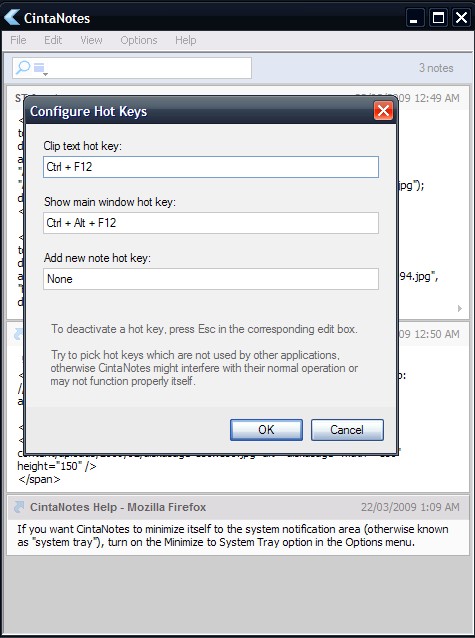
    CintaNotes is a lightweight and potentially extremely useful note taking program. At a portable download of 344KB and an executable of 625KB CintaNotes is useful and small. Notes are collected via a configurable hot key (Ctrl+F12 by default), a simple paste or by opening the program and using the Add option. In the first two cases the title of the note is automatically taken from the originating application window and if it happens to be from a web browser the URL is added to the note’s Link field.

    CintaNotes

    Each note is dated and can be tagged. A real time search bar finds them by any or all of text and title, time, link, title, text and tag. It is also possible to merge notes by selecting them, by using the usual Ctrl or Shift keys, and pressing Ctrl+M. The font and color of notes and the whole program itself can be configured as well. A hot key is configurable to bring focus to the program and also to add a new note. Perhaps the feature that makes CintaNotes most useful and hassle free is the Silent Clipping one. When checked under the Options menu the program window does not pop up whenever a note is added, when using the aforementioned Ctrl+F12 for example, the program will instead show a balloon tip at the system tray with the contents of the note being captured.

    CintaNotes runs on Windows 2000, 2003, XP and Vista and fully supports unicode text.