The not so clever article title aside SE-Explorer is a relatively new entry into the file manager/Windows Explorer alternative space. As of this date it is at version 0.0.30.600 and is not without its performance issues. The portable version tested on a XP computer is slow to start and the ever illusive zip or archive exploring or viewing seems to be a work in progress. I have tested and have looked for a file manager that handles archives well and have come up empty handed – with the possible exception of Ac Browser Plus featured here on RGdot – for the most part but SE-Explorer does come close in achieving it.

Feature-wise SE-Explorer is a good pick. Besides the aforementioned archive viewing it supports most image formats as well as viewing PDF, DOC, CHM help file and some other text based formats. Its built-in media player supports many audio and video formats which can be played as a whole folder or individually and also shuffled and repeated as a play list. A text comparer is also included as is syntax highlighting in its internal viewer, accessible by right clicking a document icon and choosing view. SE-Explorer also has a file search engine that can find files that satisfy a variety of criteria such as search ‘files by tags’ and others. The size scanner builds a drive summary and can classify or create reports based on largest files, folder sizes, file types and more. A task info tab keeps a record of file operations such as any moving and copying done and can be thought of as a log but it looks like it can include additional features in future versions of the program.
SE-Explorer runs on Windows 2000, 2003, XP, and Vista and is one to watch out for. Many more screenshots are also available at the developer’s site.
Tag: viewer
-
SE-Explorer Is A Sexy File Manager
-
FontViewOK Displays And Previews Fonts
FontViewOK is a simple no-installation 35KB program that displays fonts installed on any system. It is written by the same person who has brought us the “Quadro-View” file manager or windows explorer alternative Q-Dir.

FontViewOK is an often useful visual preview of fonts that acts as a tool to compare fonts and to see how they look like with any user entered text. Enter any text in the box near the top, choose the font size, color and style from the right of the box and scroll down to view the resulting previews. Alternatively use the drop down menu to navigate through all fonts.Given the size and nature of the program that is all there is to it but one more sometimes useful feature that may be missed is that of printing and previewing the print. This can prove practical when one wants to see how the printed version of the fonts really look like. Download FontViewOK and many more small and sometimes useful programs that do everything from saving desktop icon positions to changing a file’s time stamp at the link above.
-
PhotoScape For All Your Image Editing Needs
PhotoScape is described by its author as
PhotoScape is the fun and easy photo editing software that enables you to fix and enhance photos.
The opening screen is an attractive and clear division of functions and features that can also be accessed in tab like fashion on the top of the screen. The program also displays random flickr images but this can be turned off.
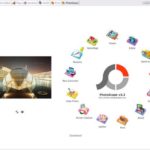
The Viewer presents the well known explorer like interface with panes for navigation and preview. From there and via right click images can be set as wallpaper, become part of a slide show, rotated and double clicked to be viewed in full screen mode. In full screen mode a right click presents the aforementioned possibilities plus others like brighten, darken, zoom, and view EXIF info.
The Editor presents an ever growing number of filters. Most filters, and other effects, can accessed either via the accompanying drop down or by clicking on their respective buttons. They include the very impressive ‘Bloom’ and ‘Blacklight’ filters that give life and clarity to images. Here one can also resize an image, frame it, add line, objects and shapes onto it, apply a mosaic effect, apply free and preset crops, reduce red eye, and even reduce the appearance of moles. The Batch Editor can do all of the above on a set of images.
Page includes many templates to group a number of images into a page that can be saved. It is possible to drag and resize images to fit them within many sizes, mixes or shapes available. Frames and filters can be added as well to produce imaginative finished pages.

Combine is another form of the Page funtion described above. Here images can be grouped vertically or horizontally to produce a strip or multipage effect. Again many sizing and framing options are available here.
AniGif creates gif animations of course and with many required controls. Of course the delay between each animated frame can be controlled as well as the background color that fills any emtpy regions when the images are not exactly the same size. Additionally PhotoScape has 7 transition effects and crucially the ability to position images within the frames (center, top-right, etc.). The latter feature is important when the pictures are not the same exact dimensions and, when using some other animators, individual frames can be off relative to the next frame, but not with PhotoScape.
Print is sort of an extension of Page and includes various forms that let the user visualize different layouts and print images with configurable alignment, brightness and dots per inches (dpi). The finished product can also include such things as the file name under each image.
Splitter divides an image into different regions, be they configurable number of equal sized rows and columns or widths and heights.
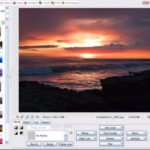
Screen Capture, captures windows, full screens, rectangular regions and copies them to the clipboard or opens them in the Editor. It is also possible to repeat the last capture.
Color Picker provides the RGB or Hex value of any region via a zoomed and draggable ‘fountainpen’. PhotoScape also keeps a recent history of captured colors.
Raw Convertor, useful for DSLR camera images, converts raw formats (DNG, CRW, TIFF, etc) to the web friendly JPG. And finally Rename batch renames files with several renaming templates such as including the EXIF date, today’s date, numbered increments and others in the output file names.
PhotoScape, currently at v3.3, packs many features in a 14MB download and is one of the most complete freeware of any kind. It does not consume too much resources as it remained well under 40MB of RAM usage throughout extended use. As mentioned it is free, looking for donations, runs under all Windows from 98 to Vista, is actively developed and looking for translators as well. -
Ac Browser Plus File Manager
Ac Browser Plus file manager or windows explorer replacement is described by its author as
Advanced, multi-window file manager and FTP client for Windows
File managers are often used by regular and power users alike to extend the functionality of Windows Explorer. There are many mainstays and popular ones like the freeware FreeCommander, UltraExplorer, and Q-Dir and the shareware XYplorer. One rarely mentioned one is the Ac Browser Plus which I have been running for over a year now.

It supports many features and is highly customizable. One of the more notable features it has is that you are able to work with many folders (unfortunately limited to 3 in the freeware version) at the same time. However many additional features are all present in the freeware version. Integrated FTP client is one. Folder synchronization is another important tool. Viewers for many image and text formats is only bettered by a zip viewer which unlike many other file viewers and explorer replacements work perfectly in my many uses. It is very useful to be able to navigate inside zip archives and Ac Browser Plus does the best job I have seen among the few viewers that actually support this feature.
The features don’t stop there, one interesting and useful feature is the ‘hot point’ where you can get file properties and a thumbnail by hovering over a small red rectangle near the file name in list views. There is a renamer included as well, and an useful address bar/breadcrumbs is available that makes folder navigation even easier. Not to mention several scripts for such things as creating file lists and opening applications.
With the very customizable views that it offers and at 2.9MB for a virtually feature complete freeware version Ac Browser Plus deserves better ratings and attention. I feel that if the developer finds more time in adding and developing the additional features like the scripting and quashes a few bugs then with a bit of promotion Ac Browser Plus will get very popular. The OS support is listed as Win XP, NT, 2000, 2003.


