As a fan of WordPress (who isn’t?) I was excited to hear about Instant WordPress via this wpmu.org post. Instant WordPress is billed as a “complete standalone, portable WordPress development environment” and “The easiest and quickest way to install WordPress!” The 54MB download installs a portable and completely self contained copy of WordPress on a PC. There is no need to go through more time consuming methods like installing wampserver , XAMPP or others if the exclusive or main use of using MySQL and php is to work with WordPress on a PC.

After installing Instant WordPress on a XP desktop I was disappointed to see that it would not start, it did generate an error (see above image) but the error was obscured by the program’s splash image. The error dialog was not movable using either the mouse or keyboard. I looked in the program’s folder, found the splash image (splash.png) and decided to resize it to a smaller size image so that the error would come into view.
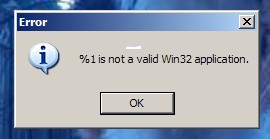
The error in question was “%1 is not a valid Win32 application.” (see above image). That particular error is often associated with Windows not reading or liking a blank space in some configuration (in many cases a batch file) of the program in question. I decided to move the Instant WordPress folder from the desktop – whose “Documents and Settings” path contains spaces – to c:\ and as expected it worked (see below image).

Instant WordPress is the easiest method yet to play with WordPress and it comes with a few dummy posts and pages. As of this post it is bundled with WordPress 3.2, MySQL 5.1.46-community-nt with phpMyAdmin, Apache 2.2.15, and PHP 5.3.2.