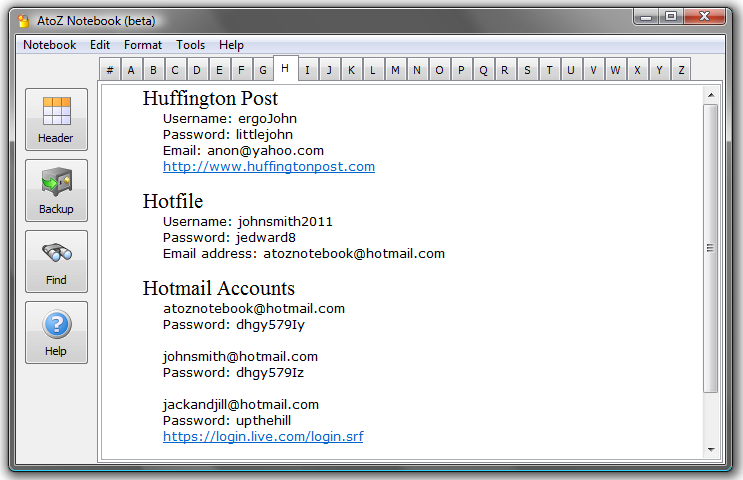
AtoZ Notebook (Version: 0.111 Beta as of this post) is a free form notebook that aims to resemble a paper notebook. It is divided into 27 tabs (a to z and #) where notes can be jotted down in alphabetically.
Once open click the Header button and start typing. Use any of the usual formatting options (font, indent, etc.) to shape the notes as required and choose a password to open your notes as well. Also one gets to choose one of two options for the location of the stored notes. AtoZ Notebook also does backups in RTF format so the notes are usable elsewhere as well, therefore sparing the user from dealing with propriety formats.


myPortablePIM is a no installation Personal Information Manager that offers a chance to keep contacts, calendar and other information in one folder and carry data on a USB key or stick. Needing to keep everything in one folder means a newly unzipped myPortablePIM approaches 90MB in size.
myPortablePIM

myPortablePIM features include tasks and notes, alarms, a ‘gmail checker’, calendar – with support for both iCal and vCard – a RSS reader, a weather checker, an image viewer, an application launcher, a password manager and an address book.

Additionally the program can be protected with a password to make carrying it around safer and includes several themes (under the Preferences menu). The different features or ‘modules’ can also be viewed on their own. One can also add icons to use within the program and configure several options like using Fahrenheit or Celcius for the weather module. myPortablePIM runs on Windows 2000, XP, Vista or 7.


Another interesting notes organizer is AllMyNotes. It stores notes in the familiar tree structure and boasts drag and drop and rich formatting as its features. It is also possible to password protect notes. AllMyNotes does both within notes and also global search. via ghacks


fSekrit is one of the many useful tools available from donationcoder. fSekrit has a very simple and useful purpose. Its purpose is to create encrypted notes and ones that are self contained. What this means is that when using fSekrit the note taking application and password setting and encrypting tool are one and the same.
Double click on the fSekrit icon and start typing or pasting (or use Import text located under the File menu) the desired text. When exiting and saving the program will prompt for a location to save an *.exe file, not a *.txt file, and then also prompt for a password. No unencrytped text is written to the system’s hard disk and the encryption used is 256bit AES, a near unbreakable encryption standard.
Download the latest beta from this thread or visit the above link for the older but non-beta release.


Total Text Container is a PIM (Personal Information Management) software described by its author as

Store Documentation, Notes, Passwords, Images, Bookmarks, Contacts, Spreadsheets, Money Transactions, Calendar Events & Tasks, iCalander events, CD/DVD/Movie catalogs, Multi layer encryption, Portable, xml database, all in one powerful PIM app.

Total Text Container is a pretty complete and feature rich software that allows you to do a lot and organize your information all in one folder.

ttc

It has many interesting and valuable features.  It can store all sorts of lists, such as movies, bookmarks, confidential information and images. Syntax highlighted code and snippets can be saved as well. It is possible to add clipboards and even tasks to Total Text Container and access them via the program’s tray icon without actually wading through the program itself. There is also a ‘Mix Frame’  feature which allows the user to work on different ‘frames’ such as notes, spreadsheets, code and others at the same time, though it seems to be a work in progress in my tests, I got a few access violation errors while attempting to add or show frames.

TTC is worth checking out and though at alpha v0.a070 as of this writing it can prove useful with a bit of caution because as mentioned access violation errors can pop up from time to time. The author claims that

As long as TTC is below version 1.00 then its still in beta stage, I use TTC almost every day so i def want it to be error free myself. I fix errors as i find them but if I don’t know about an error i can’t fix it so let me know on my forums on sourceforge.

so one should be able to get some help just in case. Have a look at http://mtirnanic.googlepages.com/

© 2012 RGdot Suffusion theme by Sayontan Sinha